Time tracking for creative agencies: what to track and how to make it stick
By Huw Cushing, Founder, Sprintora · · 5 min read
Time tracking for agencies has a poor reputation, and the reason is not hard to find. Most people have used a system that asked for too much, gave nothing back, and felt like surveillance. Yet time tracking is how a studio finds out what its work cost. Without it, margin is a guess you make after the invoice has gone out.
This guide covers what a creative studio should track, why timesheets fail, and how to build a habit your team will keep because it helps them.
Why a studio tracks time at all
Time data answers questions you cannot answer otherwise. Which projects made money and which did not? Where do our estimates run light? How much of the team's time went to billable work? What does it really cost to deliver a retainer?
Time is the largest cost in a studio, so any margin figure without it is incomplete. It also feeds planning. Next quarter's estimates are only as good as the hours you recorded last quarter.
What to track
Track time against projects and tasks, including internal and pitch work. If it takes hours and you leave it out, you underestimate the cost of winning and running the studio.
Split billable from non-billable. Utilisation and efficiency depend on it, and so does an honest view of what each project cost. The utilisation vs margin guide covers how to read the two together.
Capture enough detail to explain an overrun. A project and task is usually enough. A note on the entry helps when a number looks odd.
Stop there. Every extra field makes people skip entries. The test for any field is whether someone will act on the data.
Why people skip it
Timesheets get done on Friday afternoon from memory. The entries are late, rounded and biased towards the work that stood out. People round to full days, move hours between projects to make the week add up, and quietly stop trusting the numbers.
Once the data is unreliable, nobody has a reason to fill it in properly next week. That loop is the real problem. Tracking tools are rarely blamed, but the loop is usually what kills adoption.
There is a second reason: people see no benefit. If entering hours disappears into a report only the owner reads, tracking is a tax.
How to make it stick
Start a timer when the work starts
A timer captures time while you remember it. The habit takes a week or two to form, and a visible timer in the top bar helps.
Pre-fill from the plan
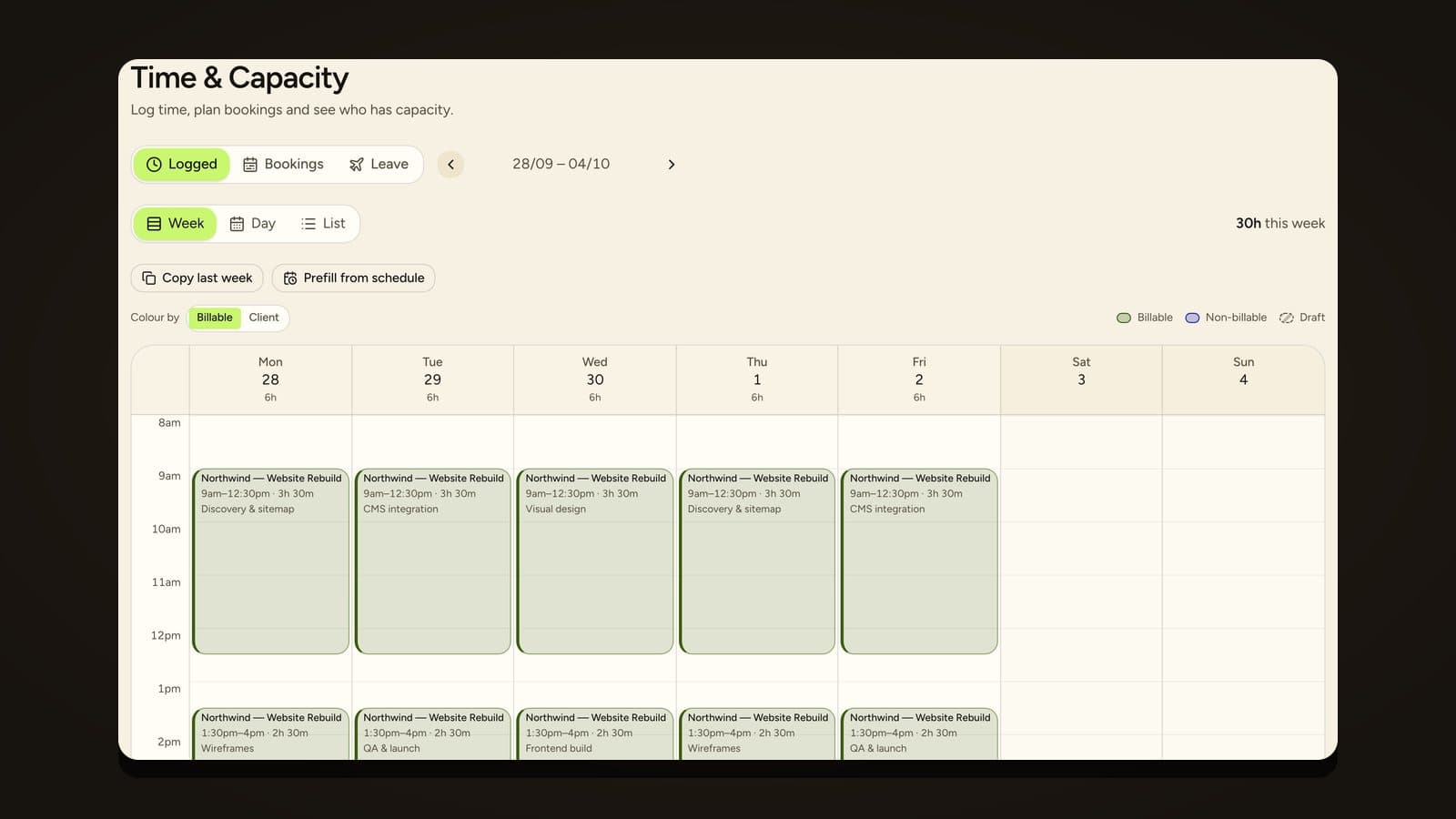
If the plan says Priya is on the brand refresh for 20 hours this week, her timesheet can open with draft rows for that work. She confirms, adjusts or deletes. Confirming is much quicker than building from nothing, and it keeps entries aligned with the plan. In Sprintora, planned hours appear as draft timesheet rows you confirm with one tap, and unconfirmed rows never touch cost or margin.
Keep it light
Fewer fields, shorter entries. A timer plus a project and task pick should take seconds.
Show people what it is for
Show the team margin on their own projects, burn against budget, and how estimates compared with actuals. When people see that their hours changed a decision, they start to care about the numbers.
Do not use it to police people
Track against projects, review as a team and use it to fix plans. A studio that uses timesheets to question individual minutes will get less accurate data, not more.
How accurate does it need to be?
Close enough to compare with the fee. The nearest 15 minutes is usually fine. What matters more is that entries are made close to the time and that they are honest. A five minute error over a project is noise. A habit of moving hours to hide an overrun is a problem you want to see.
Connecting time to margin
Time on its own is a count of hours. It becomes useful when each hour carries a cost rate, because then every confirmed entry updates the project's cost and margin. The margin guide shows how the pieces fit. In Sprintora, time tracking is built in with timers and timesheets, and every confirmed hour updates the project's margin, so there is no export and no re-entry.
Moving from another tracker
If you already track time somewhere else, you do not have to start from zero. Sprintora imports from Paymo: clients, projects, tasks, people and hours. Imported hours count wherever native hours count, including cost and margin. The guide to moving your time history lists what to check.
A simple rollout plan
Week one: pick one tool, set cost rates, and ask everyone to start timers on live projects.
Week two: review entries as a team. Spot gaps, fix confusing project or task names, and drop any field nobody uses.
Week three: show the first margin view for a live project and talk about what it changes.
Week four: compare estimated and actual hours on a completed phase and use the result in the next quote.
Frequently asked questions
Is time tracking micromanagement? It does not have to be. Track against projects and tasks, review the data as a team, and use it to improve plans and estimates. Using it to question individual minutes damages trust and data quality.
What should an agency track time against? Projects and tasks, including internal, pitch and admin work. Split billable from non-billable so utilisation and margin are honest.
How do I get my team to track time? Make it fast with timers and pre-filled rows, keep the fields few, and show people how the hours are used. Habit follows usefulness.
Can I import my old time data? Sprintora imports from Paymo, bringing clients, projects, tasks, people and hours. Check what is live for other trackers before you plan a move.
How accurate does time tracking need to be? Accurate enough to compare with the fee. Entries made at the time, rounded to the nearest 15 minutes, are usually good enough.
Founding studios get Sprintora free until 31 March 2027, then A$12 per planned person per month. See pricing.